
以前に ConoHa VPS 2.0 API 向けの Let’s Encrypt のワイルドカード証明書を自動更新する方法を説明しましたが、v3.0 向けの API には対応していませんでした。

ConoHa VPS 3.0 API 向けのスクリプトもいくつかありますが、試したところ上手く行かなかったので自作したものを紹介します。
環境
- OS:AlmaLinux 9
- VPS:ConoHa VPS(ver3.0)
- DNS:ConoHa DNS で管理


事前準備
Certbot のインストール
EPEL リポジトリから Certbot をインストールします。
dnf install certbot※EPEL リポジトリが未導入の場合は下記を参考に入れてください。
jq コマンドのインストール
JSON を操作する際に jq コマンドを使用しますので、インストールしておきます。
dnf install jqbind-utils のインストール
DNS 情報を調べる際に dig コマンドを使用するため、bind-utils をインストールします。
dnf install bind-utilsletsencrypt-dns-conoha のセットアップ
GitHub から v3.0 対応のスクリプトをダウンロードします。
git clone https://github.com/psychoco-net/letsencrypt-dns-conoha.gitLet's Encrypt ディレクトリ内で完結させたいので、/etc/letsencrypt/conoha にファイル一式を移動します。
mv letsencrypt-dns-conoha/ /etc/letsencrypt/conohaスクリプトファイルに実行権限を付与します。
chmod +x /etc/letsencrypt/conoha/*.sh設定ファイル(.env)をリネームします。
mv /etc/letsencrypt/conoha/.env.example /etc/letsencrypt/conoha/.envConoHa VPS コントロールパネルにログインします。
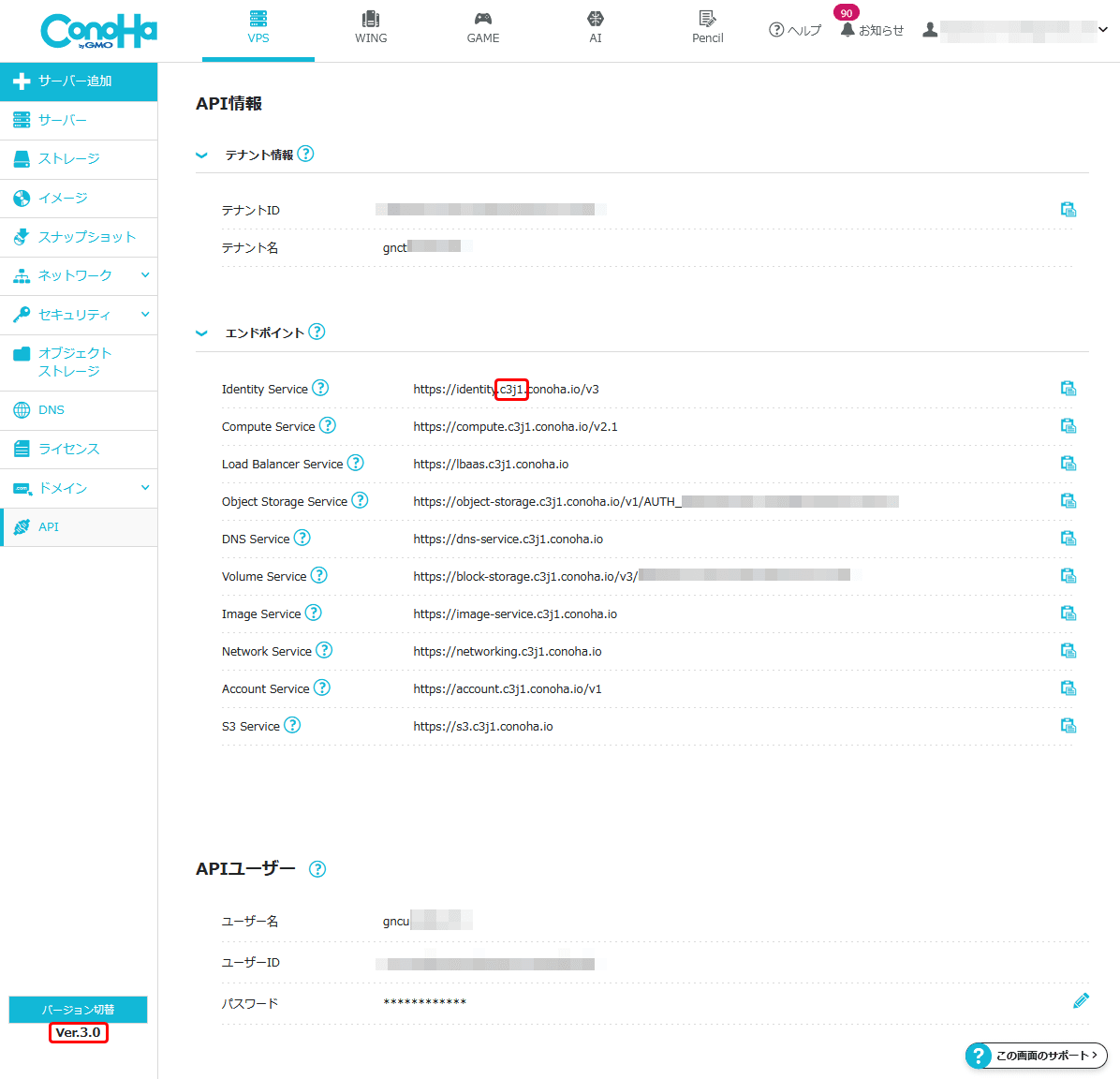
API のタブに移動し、API のユーザーネームとパスワード、テナント ID を確認します。
また、エンドポイントの URL からリージョン(v3.0 なら c3j1、v2.0 なら tyo1 か tyo2)もあわせて確認します。
上記の内容を、letsencrypt-dns-conoha の設定ファイルに記載します。
chown root:root /etc/letsencrypt/conoha/.env
chmod 600 /etc/letsencrypt/conoha/.env
vi /etc/letsencrypt/conoha/.env
# ConoHa Region (v2: tyo1 or tyo2, v3: c3j1)
CNH_REGION=c3j1
# ConoHa API Tenant ID
CNH_TENANT_ID=テナントID
# ConoHa API User name
CNH_USERNAME=APIユーザー名
# ConoHa API User Password
CNH_PASSWORD='APIパスワード'
# --- Log rotation (optional; defaults used if omitted) ---
# Rotate conoha_dns.log when it exceeds this size in bytes (default 1048576 = 1 MiB)
LOG_MAX_BYTES=1048576
# Number of rotated generations to keep (default 3)
LOG_GENERATIONS=3SSL 証明書の取得
まずは dry-run でテストします。
certbot certonly \
(out)   --dry-run \
(out)   --manual \
(out)   --agree-tos \
(out)   --no-eff-email \
(out)   --preferred-challenges dns-01 \
(out)   --server https://acme-v02.api.letsencrypt.org/directory \
(out)   -d "example.com" \
(out)   -d "*.example.com" \
(out)   -m "your-mail@example.com" \
(out)   --manual-auth-hook /etc/letsencrypt/conoha/create_conoha_dns_record.sh \
(out)   --manual-cleanup-hook /etc/letsencrypt/conoha/delete_conoha_dns_record.sh
(out) Saving debug log to /var/log/letsencrypt/letsencrypt.log
(out) Simulating renewal of an existing certificate for example.com and *.example.com
(out) Hook '--manual-auth-hook' for example.com ran with output:
(out)  {"uuid":"xxxxxxxx-xxxx-xxxx-xxxx-xxxxxxxxxxxx","domain_uuid":"xxxxxxxx-xxxx-xxxx-xxxx-xxxxxxxxxxxx","name":"_acme-challenge.example.com.","type":"TXT","data":"xxxxxxxxxxxxxxxxxxxxxxxxxxxxxxxxxxxxxxxxxxx","priority":null,"weight":null,"port":null,"ttl":60,"created_at":"2026-05-19T05:38:32.120941Z","updated_at":"2026-05-19T05:38:32.120977Z"}Polling authoritative NS: b.conoha-dns.org.
(out)  Attempt 1/36: TXT record not visible yet on b.conoha-dns.org.. Retrying in 5s...
(out)  Attempt 2/36: TXT record not visible yet on b.conoha-dns.org.. Retrying in 5s...
(out)  Attempt 3/36: TXT record not visible yet on b.conoha-dns.org.. Retrying in 5s...
(out)  Attempt 4/36: TXT record not visible yet on b.conoha-dns.org.. Retrying in 5s...
(out)  Attempt 5/36: TXT record not visible yet on b.conoha-dns.org.. Retrying in 5s...
(out)  Attempt 6/36: TXT record not visible yet on b.conoha-dns.org.. Retrying in 5s...
(out)  Attempt 7/36: TXT record not visible yet on b.conoha-dns.org.. Retrying in 5s...
(out)  Attempt 8/36: TXT record not visible yet on b.conoha-dns.org.. Retrying in 5s...
(out)  Attempt 9/36: TXT record not visible yet on b.conoha-dns.org.. Retrying in 5s...
(out)  Attempt 10/36: TXT record not visible yet on b.conoha-dns.org.. Retrying in 5s...
(out)  Attempt 11/36: TXT record not visible yet on b.conoha-dns.org.. Retrying in 5s...
(out)  Attempt 12/36: TXT record not visible yet on b.conoha-dns.org.. Retrying in 5s...
(out)  Attempt 13/36: TXT record not visible yet on b.conoha-dns.org.. Retrying in 5s...
(out)  Attempt 14/36: TXT record not visible yet on b.conoha-dns.org.. Retrying in 5s...
(out)  Attempt 15/36: TXT record not visible yet on b.conoha-dns.org.. Retrying in 5s...
(out)  Attempt 16/36: TXT record not visible yet on b.conoha-dns.org.. Retrying in 5s...
(out)  Attempt 17/36: TXT record not visible yet on b.conoha-dns.org.. Retrying in 5s...
(out)  TXT record visible on authoritative NS (attempt 18/36)
(out) Hook '--manual-auth-hook' for example.com ran with output:
(out)  {"uuid":"xxxxxxxx-xxxx-xxxx-xxxx-xxxxxxxxxxxx","domain_uuid":"xxxxxxxx-xxxx-xxxx-xxxx-xxxxxxxxxxxx","name":"_acme-challenge.example.com.","type":"TXT","data":"xxxxxxxxxxxxxxxxxxxxxxxxxxxxxxxxxxxxxxxxxxx","priority":null,"weight":null,"port":null,"ttl":60,"created_at":"2026-05-19T05:40:23.179844Z","updated_at":"2026-05-19T05:40:23.179882Z"}Polling authoritative NS: b.conoha-dns.org.
(out)  Attempt 1/36: TXT record not visible yet on b.conoha-dns.org.. Retrying in 5s...
(out)  Attempt 2/36: TXT record not visible yet on b.conoha-dns.org.. Retrying in 5s...
(out)  Attempt 3/36: TXT record not visible yet on b.conoha-dns.org.. Retrying in 5s...
(out)  Attempt 4/36: TXT record not visible yet on b.conoha-dns.org.. Retrying in 5s...
(out)  Attempt 5/36: TXT record not visible yet on b.conoha-dns.org.. Retrying in 5s...
(out)  Attempt 6/36: TXT record not visible yet on b.conoha-dns.org.. Retrying in 5s...
(out)  Attempt 7/36: TXT record not visible yet on b.conoha-dns.org.. Retrying in 5s...
(out)  Attempt 8/36: TXT record not visible yet on b.conoha-dns.org.. Retrying in 5s...
(out)  Attempt 9/36: TXT record not visible yet on b.conoha-dns.org.. Retrying in 5s...
(out)  Attempt 10/36: TXT record not visible yet on b.conoha-dns.org.. Retrying in 5s...
(out)  Attempt 11/36: TXT record not visible yet on b.conoha-dns.org.. Retrying in 5s...
(out)  Attempt 12/36: TXT record not visible yet on b.conoha-dns.org.. Retrying in 5s...
(out)  Attempt 13/36: TXT record not visible yet on b.conoha-dns.org.. Retrying in 5s...
(out)  Attempt 14/36: TXT record not visible yet on b.conoha-dns.org.. Retrying in 5s...
(out)  Attempt 15/36: TXT record not visible yet on b.conoha-dns.org.. Retrying in 5s...
(out)  Attempt 16/36: TXT record not visible yet on b.conoha-dns.org.. Retrying in 5s...
(out)  Attempt 17/36: TXT record not visible yet on b.conoha-dns.org.. Retrying in 5s...
(out)  Attempt 18/36: TXT record not visible yet on b.conoha-dns.org.. Retrying in 5s...
(out)  TXT record visible on authoritative NS (attempt 19/36)
(out) The dry run was successful.
問題なさそうなので、実際に SSL 証明書を取得します。
certbot certonly \
(out)   --manual \
(out)   --agree-tos \
(out)   --no-eff-email \
(out)   --preferred-challenges dns-01 \
(out)   --server https://acme-v02.api.letsencrypt.org/directory \
(out)   -d "example.com" \
(out)   -d "*.example.com" \
(out)   -m "your-mail@example.com" \
(out)   --manual-auth-hook /etc/letsencrypt/conoha/create_conoha_dns_record.sh \
(out)   --manual-cleanup-hook /etc/letsencrypt/conoha/delete_conoha_dns_record.sh
(out)  Saving debug log to /var/log/letsencrypt/letsencrypt.log
(out)  Requesting a certificate for example.com and *.example.com
(out)  Hook '--manual-auth-hook' for example.com ran with output:
(out)   {"uuid":"xxxxxxxx-xxxx-xxxx-xxxx-xxxxxxxxxxxx","domain_uuid":"xxxxxxxx-xxxx-xxxx-xxxx-xxxxxxxxxxxx","name":"_acme-challenge.example.com.","type":"TXT","data":"xxxxxxxxxxxxxxxxxxxxxxxxxxxxxxxxxxxxxxxxxxx","priority":null,"weight":null,"port":null,"ttl":60,"created_at":"2026-05-19T07:54:20.323994Z","updated_at":"2026-05-19T07:54:20.324027Z"}Polling authoritative NS: b.conoha-dns.org.
(out)   Attempt 1/36: TXT record not visible yet on b.conoha-dns.org.. Retrying in 5s...
(out)   Attempt 2/36: TXT record not visible yet on b.conoha-dns.org.. Retrying in 5s...
(out)   Attempt 3/36: TXT record not visible yet on b.conoha-dns.org.. Retrying in 5s...
(out)   Attempt 4/36: TXT record not visible yet on b.conoha-dns.org.. Retrying in 5s...
(out)   Attempt 5/36: TXT record not visible yet on b.conoha-dns.org.. Retrying in 5s...
(out)   Attempt 6/36: TXT record not visible yet on b.conoha-dns.org.. Retrying in 5s...
(out)   Attempt 7/36: TXT record not visible yet on b.conoha-dns.org.. Retrying in 5s...
(out)   Attempt 8/36: TXT record not visible yet on b.conoha-dns.org.. Retrying in 5s...
(out)   Attempt 9/36: TXT record not visible yet on b.conoha-dns.org.. Retrying in 5s...
(out)   Attempt 10/36: TXT record not visible yet on b.conoha-dns.org.. Retrying in 5s...
(out)   Attempt 11/36: TXT record not visible yet on b.conoha-dns.org.. Retrying in 5s...
(out)   Attempt 12/36: TXT record not visible yet on b.conoha-dns.org.. Retrying in 5s...
(out)   Attempt 13/36: TXT record not visible yet on b.conoha-dns.org.. Retrying in 5s...
(out)   Attempt 14/36: TXT record not visible yet on b.conoha-dns.org.. Retrying in 5s...
(out)   Attempt 15/36: TXT record not visible yet on b.conoha-dns.org.. Retrying in 5s...
(out)   Attempt 16/36: TXT record not visible yet on b.conoha-dns.org.. Retrying in 5s...
(out)   Attempt 17/36: TXT record not visible yet on b.conoha-dns.org.. Retrying in 5s...
(out)   Attempt 18/36: TXT record not visible yet on b.conoha-dns.org.. Retrying in 5s...
(out)   Attempt 19/36: TXT record not visible yet on b.conoha-dns.org.. Retrying in 5s...
(out)   TXT record visible on authoritative NS (attempt 20/36)
(out)  Hook '--manual-auth-hook' for example.com ran with output:
(out)   {"uuid":"2812d89e-14f1-4859-837b-57d151ae31e6","domain_uuid":"xxxxxxxx-xxxx-xxxx-xxxx-xxxxxxxxxxxx","name":"_acme-challenge.example.com.","type":"TXT","data":"xxxxxxxxxxxxxxxxxxxxxxxxxxxxxxxxxxxxxxxxxxx","priority":null,"weight":null,"port":null,"ttl":60,"created_at":"2026-05-19T07:56:23.185662Z","updated_at":"2026-05-19T07:56:23.185699Z"}Polling authoritative NS: a.conoha-dns.com.
(out)   Attempt 1/36: TXT record not visible yet on a.conoha-dns.com.. Retrying in 5s...
(out)   Attempt 2/36: TXT record not visible yet on a.conoha-dns.com.. Retrying in 5s...
(out)   Attempt 3/36: TXT record not visible yet on a.conoha-dns.com.. Retrying in 5s...
(out)   Attempt 4/36: TXT record not visible yet on a.conoha-dns.com.. Retrying in 5s...
(out)   Attempt 5/36: TXT record not visible yet on a.conoha-dns.com.. Retrying in 5s...
(out)   Attempt 6/36: TXT record not visible yet on a.conoha-dns.com.. Retrying in 5s...
(out)   Attempt 7/36: TXT record not visible yet on a.conoha-dns.com.. Retrying in 5s...
(out)   Attempt 8/36: TXT record not visible yet on a.conoha-dns.com.. Retrying in 5s...
(out)   Attempt 9/36: TXT record not visible yet on a.conoha-dns.com.. Retrying in 5s...
(out)   Attempt 10/36: TXT record not visible yet on a.conoha-dns.com.. Retrying in 5s...
(out)   Attempt 11/36: TXT record not visible yet on a.conoha-dns.com.. Retrying in 5s...
(out)   Attempt 12/36: TXT record not visible yet on a.conoha-dns.com.. Retrying in 5s...
(out)   Attempt 13/36: TXT record not visible yet on a.conoha-dns.com.. Retrying in 5s...
(out)   Attempt 14/36: TXT record not visible yet on a.conoha-dns.com.. Retrying in 5s...
(out)   Attempt 15/36: TXT record not visible yet on a.conoha-dns.com.. Retrying in 5s...
(out)   Attempt 16/36: TXT record not visible yet on a.conoha-dns.com.. Retrying in 5s...
(out)   Attempt 17/36: TXT record not visible yet on a.conoha-dns.com.. Retrying in 5s...
(out)   Attempt 18/36: TXT record not visible yet on a.conoha-dns.com.. Retrying in 5s...
(out)   TXT record visible on authoritative NS (attempt 19/36)
(out)
(out)  Successfully received certificate.
(out)  Certificate is saved at: /etc/letsencrypt/live/example.com/fullchain.pem
(out)  Key is saved at:         /etc/letsencrypt/live/example.com/privkey.pem
(out)  This certificate expires on 2026-08-17.
(out)  These files will be updated when the certificate renews.
(out)  Certbot has set up a scheduled task to automatically renew this certificate in the background.
(out)
(out)  - - - - - - - - - - - - - - - - - - - - - - - - - - - - - - - - - - - - - - - -
(out)  If you like Certbot, please consider supporting our work by:
(out)   * Donating to ISRG / Let's Encrypt:   https://letsencrypt.org/donate
(out)   * Donating to EFF:                    https://eff.org/donate-le
(out)  - - - - - - - - - - - - - - - - - - - - - - - - - - - - - - - - - - - - - - - -
証明書の自動更新
証明書を自動更新してくれる certbot-renew.service のステータスを確認します。
systemctl status certbot-renew.service
(out) ○ certbot-renew.service - This service automatically renews any certbot certificates found
(out)      Loaded: loaded (/usr/lib/systemd/system/certbot-renew.service; static)
(out)      Active: inactive (dead) since XXX XXXX-XX-XX XX:XX:XX JST; XXh XXmin ago
(out) TriggeredBy: ● certbot-renew.timer
(out)     Process: 269762 ExecStart=/usr/bin/certbot renew --noninteractive --no-random-sleep-on-renew $PRE_HOOK $POST_HOOK $RENEW_HOOK $DEPLOY_HOOK $CERTBOT_ARGS (code=exited, status=0/SUCCESS)
(out)    Main PID: 269762 (code=exited, status=0/SUCCESS)
(out)         CPU: 366ms
certbot-renew.service は certbot-renew.timer によって呼び出され、定期的に実行されます。
systemctl status certbot-renew.timer
(out) ● certbot-renew.timer - This is the timer to set the schedule for automated renewals
(out)      Loaded: loaded (/usr/lib/systemd/system/certbot-renew.timer; enabled; preset: enabled)
(out)      Active: active (waiting) since XXX XXXX-XX-XX XX:XX:XX JST; X month X days ago
(out)       Until: XXX XXXX-XX-XX XX:XX:XX JST; X month X days ago
(out)     Trigger: XXX XXXX-XX-XX XX:XX:XX JST; Xh left
(out)    Triggers: ● certbot-renew.service
(out)
(out) Notice: journal has been rotated since unit was started, output may be incomplete.タイマーが無効だった場合は以下のコマンドで有効化できます。
systemctl enable --now certbot-renew.timer
systemctl list-timers --all certbot-renew.timer
証明書が更新された際に、自動的にサービスを再起動して反映させるためには /etc/letsencrypt/renewal-hooks/deploy/ の中にスクリプトを設置します。
#!/bin/bash
systemctl restart httpd
#systemctl restart lshttpd
systemctl restart postfix
systemctl restart dovecot
systemctl restart rspamd
restart-services.sh のパーミッションを変更しておきます。
chown root:root /etc/letsencrypt/renewal-hooks/deploy/restart-services.sh
chmod 700 /etc/letsencrypt/renewal-hooks/deploy/restart-services.sh
まとめ
設定時に記事を書きましたが、自動更新が問題なく行われるか確認するために放置していたところ、ずいぶん時間が経ってしまいました。(記事の中の日時が古いのはそのためです)
ConoHa VPS MCP Server が使えたら面白そうでしたが、現在では DNS の操作ができないため AI 経由での DNS-01 の更新はまだ難しそうです。


コメント